Quick Answer
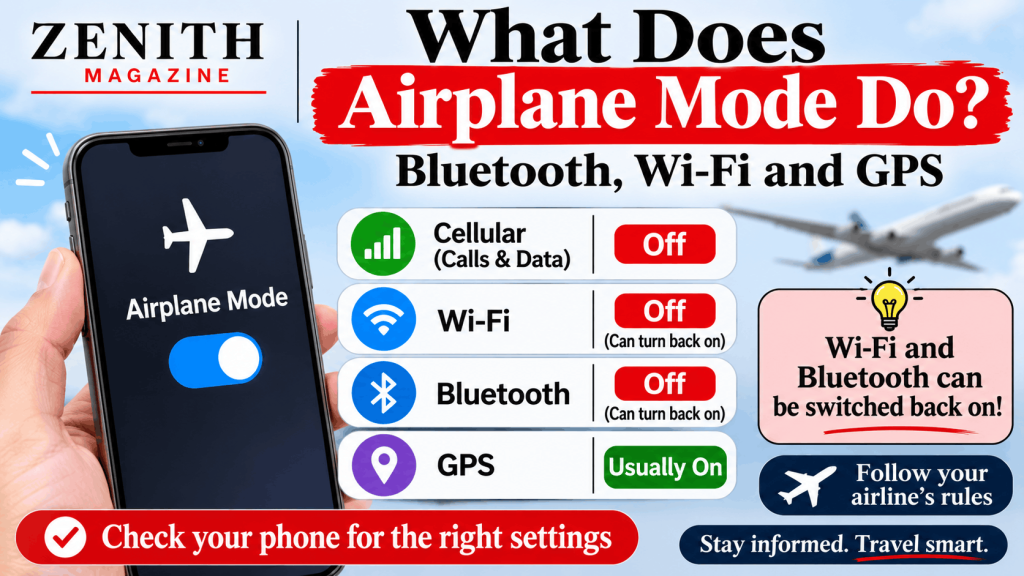
What does airplane mode do? It switches off your phone’s cellular connection and, depending on the device, Wi-Fi and Bluetooth, so it stops sending and receiving signals. You can usually switch Wi-Fi or Bluetooth back on afterwards. Apple says you can use both in Airplane Mode if the airline allows it. GPS is generally not switched off. On a UK flight, follow the airline’s own wording and crew instructions.
Key Takeaways
- Airplane mode is a starting point, not a fixed list. Apple and Google describe different Bluetooth behaviour, and both let you turn Wi-Fi or Bluetooth back on, so check the icons on your own phone.
- It cuts off calls, texts and app updates that need a signal, but not everything: GPS generally keeps working, Wi-Fi calling can bring calls back if you switch Wi-Fi on, and the phone can still vibrate for alarms and local alerts.
- The flying rules come from airlines and regulators, and some sources we found are old. British Airways, for example, says Bluetooth headphones must be off for taxi, take-off and landing.
People have used airplane mode on flights for years, but many of the questions people ask are about what happens away from the airport: whether calls still come through, whether a family location app still works, and what it means for a smartwatch. This article covers the answers we could source and says plainly where we could not.
All facts were checked on 31 October 2026. Phone software and airline rules change, so check your own phone and airline.
What does airplane mode do?
Airplane mode (called flight mode by many UK airlines) is a single setting that turns off your phone’s wireless connections. Apple’s support page (published 11 February 2026) says that with Airplane Mode you can turn off cellular and Wi-Fi on your device during a flight, and describes it as turning off all radios except Bluetooth. It also says that if the airline allows it, you can still use Wi-Fi and Bluetooth in Airplane Mode.
Google’s Pixel help page describes it differently: when you first turn on Airplane mode on an Android phone, Wi-Fi and Bluetooth turn off, but you can change a setting to keep wireless connections on, and the phone remembers your choice next time. The two pages are not saying the same thing about Bluetooth, which is why we recommend checking the Bluetooth icon on your own phone after you switch the mode on.
| Feature | What usually happens in airplane mode | Source |
| Cellular calls and data | Switched off | Apple Support |
| Wi-Fi | Switched off, but can be switched back on | Apple Support, Google Pixel Help |
| Bluetooth | Apple: stays available; Pixel: turns off at first, can be kept on | Apple Support, Google Pixel Help |
| GPS | Generally not switched off | SlashGear, Life360 |
What happens when someone calls you on airplane mode?
According to SlashGear (29 May 2025), the call will typically be directed to voicemail, and your phone will not ring or show a missed call notification until you turn airplane mode off and reconnect. It adds that exactly what happens can vary by provider. Another article (Tech With Tech, 20 June 2024) is inconsistent about whether the caller hears ringing or goes straight to voicemail. We found no UK network page that confirms the behaviour, so treat this as typical rather than guaranteed.
Does airplane mode stop text messages from coming through?
Yes, for the time you are offline, but they usually arrive later. Tech With Tech says standard text messages (SMS) cannot be delivered immediately, are held, and are forwarded once you turn airplane mode off and reconnect. We could not find a source on iMessage or WhatsApp, which use data or Wi-Fi and so would need you to switch Wi-Fi back on.
Why does my phone still vibrate on airplane mode?
We found no source that answers this directly. Our reasoning, which is not a quoted rule, is that airplane mode switches off radios, not the phone’s vibration motor, so alarms, timers and alerts generated on the phone itself can still vibrate. Notifications that depend on a signal, such as a new message, would not arrive until you reconnect.
Bluetooth and wifi in airplane mode
Does airplane mode turn off Bluetooth?
It depends on the phone and the version. Apple’s page says Airplane Mode turns off all radios except Bluetooth, but also says that if you turn Bluetooth off while in Airplane Mode, your device turns it off the next time too. Google’s Pixel page says Wi-Fi and Bluetooth turn off at first, but you can keep them on. If you need earbuds, check the Bluetooth icon after switching airplane mode on, and be ready to turn it off if the cabin crew ask.
Can you use wifi while on airplane mode?
Yes, you can switch Wi-Fi back on after turning airplane mode on, according to Apple, which says you can still use Wi-Fi and Bluetooth in Airplane Mode if the airline allows it. Google’s Pixel page also describes keeping wireless connections on. On a plane, onboard Wi-Fi is the airline’s service. British Airways says Wi-Fi is available on selected routes and can be used while airborne, starting from the announcement about ten or twenty minutes before landing.
Can you receive calls over wifi calling on airplane mode?
Possibly, on the ground. If Wi-Fi is switched back on and Wi-Fi calling is enabled, calls can come through, according to SlashGear. This depends on your carrier supporting Wi-Fi calling and on a working Wi-Fi network. Apple’s Wi-Fi calling page (8 October 2026) does not address airplane mode, so we are relying on SlashGear and a user reply on Apple’s forum. Airlines may not allow it: British Airways says text and call functions can only be used while boarding and taxiing to the stand.
How to turn on airplane mode on Apple Watch but not iPhone
Apple’s page says you press the side button on the watch, open Control Center, and tap the Airplane Mode button (swipe up from the watch face on watchOS 9 and earlier). Apple also describes a setting in the Apple Watch app on iPhone, under General then Airplane Mode, called Mirror iPhone. Our reading is that the watch will only follow the iPhone if you have that setting switched on, so leave it off if you want to control the two separately. Apple’s page does not spell this out.
Does airplane mode disconnect your Apple Watch cellular?
Apple’s page on Bluetooth, Wi-Fi and cellular (published 11 December 2025) says a watch with GPS and cellular uses cellular when Bluetooth and Wi-Fi are not available, and that you can turn cellular off in Control Center. It does not mention Airplane Mode. Apple’s Airplane Mode page says the mode turns off cellular and Wi-Fi on your device, so we expect the watch’s cellular to go off too, but neither page states this for the watch.
In-flight rules in the UK
There is no single rule you can quote from one UK source, and some of the official material is old.
- The UK Civil Aviation Authority (CAA) published a briefing, CAP 1066, in April 2014. It said most airlines allowed smartphones, tablets and laptops in flight mode during the cruise phase, with devices off or not in use during taxi, take-off and landing unless the crew say otherwise. It said airlines could apply to the CAA to allow flight mode for the whole flight. It did not mention Bluetooth by name. We could not open a current CAA page.
- The European Union Aviation Safety Agency (EASA) said on 26 September 2014 that its guidance allowed airlines to let passengers keep devices on without airplane mode, and use them throughout the flight, after a safety assessment.
- British Airways, in undated wording, says handheld devices can be used at all times if you enable flight mode before departure. It also says Bluetooth headphones can be used during the flight but must be switched off for taxi, take-off and landing, and that you should remove headphones for the safety briefing.
Our reading is that the sensible approach is to switch on airplane mode before you board, then follow your airline’s wording and the cabin crew. Different airlines may differ from British Airways.
Saving battery
We found no primary source that quantifies battery savings from airplane mode. Our reasoning is that switching off cellular and Wi-Fi stops the phone searching for a signal, which is the main reason people use it in places with little or no coverage. You can then turn Bluetooth back on if you need earbuds. If battery matters, test it yourself on your own phone.
Common questions
Does airplane mode turn off GPS?
Generally no. Life360 (updated 14 August 2024) says airplane mode will not turn off your phone’s internal GPS system, and SlashGear (25 August 2024) says most mobile phones do not disable GPS or location services when airplane mode is switched on. Apps with maps you have downloaded in advance may work offline, while live navigation needs a signal.
Does airplane mode stop Life360 from tracking your location?
It stops Life360 sharing while the phone is offline, but it does not switch GPS off. Life360 says location-sharing apps need cellular or Wi-Fi, and other location-sharing apps will display your last known location. We found nothing on exactly what circle members see in Life360. If you want others to know you are in the air, telling them is the simplest approach.
How to trick find my iphone using airplane mode
We are not going to explain how to mislead a tracking tool, whether that is a family sharing arrangement or a lost-device feature. What we can say from our sources: SlashGear (25 August 2024) reports that, in its testing, Find My did not locate an iPhone in airplane mode until it reconnected to Wi-Fi. We have not tested this, and Apple’s own page we opened did not cover it. If your concern is privacy or being tracked by someone you do not want to share with, Apple’s Safety Check feature (in Settings, under Privacy and Security on iOS 16 or later) lets you review and stop sharing your information with people and apps.
Frequently Asked Questions
Do I have to use airplane mode on a plane?
Usually yes, if your airline asks for flight mode. British Airways says handheld devices can be used at all times if flight mode is on. EASA said in 2014 that its guidance allowed airlines to permit devices on without airplane mode. Follow your airline and crew.
Can I use Bluetooth headphones on a plane?
British Airways says Bluetooth headphones can be used during the flight but must be switched off for taxi, take-off and landing. Other airlines may differ. Turn Bluetooth back on after enabling airplane mode if your phone switched it off.
Will I still get texts and calls in airplane mode?
Not until you reconnect, unless you switch Wi-Fi on and use Wi-Fi calling. Calls typically go to voicemail with no missed-call alert, and standard texts are held and delivered later, according to SlashGear and Tech With Tech. Behaviour can vary by carrier.
Does airplane mode stop location tracking?
Not completely. Life360 says airplane mode does not turn off your phone’s GPS, but apps that share your location need a signal and will show your last known location. To stop sharing altogether, turn off location sharing or use Safety Check on iPhone.
Can I use Wi-Fi in airplane mode?
Yes. Apple says you can still use Wi-Fi and Bluetooth in Airplane Mode if the airline allows it. Google’s Pixel page also describes keeping wireless connections on. On a plane, you would be using the airline’s Wi-Fi where it is offered.
Does airplane mode work the same on every phone?
No. Apple says it turns off all radios except Bluetooth, while Google’s Pixel page says Wi-Fi and Bluetooth turn off at first and your setting is remembered. Check your own phone’s icons after switching it on.