Quick Answer
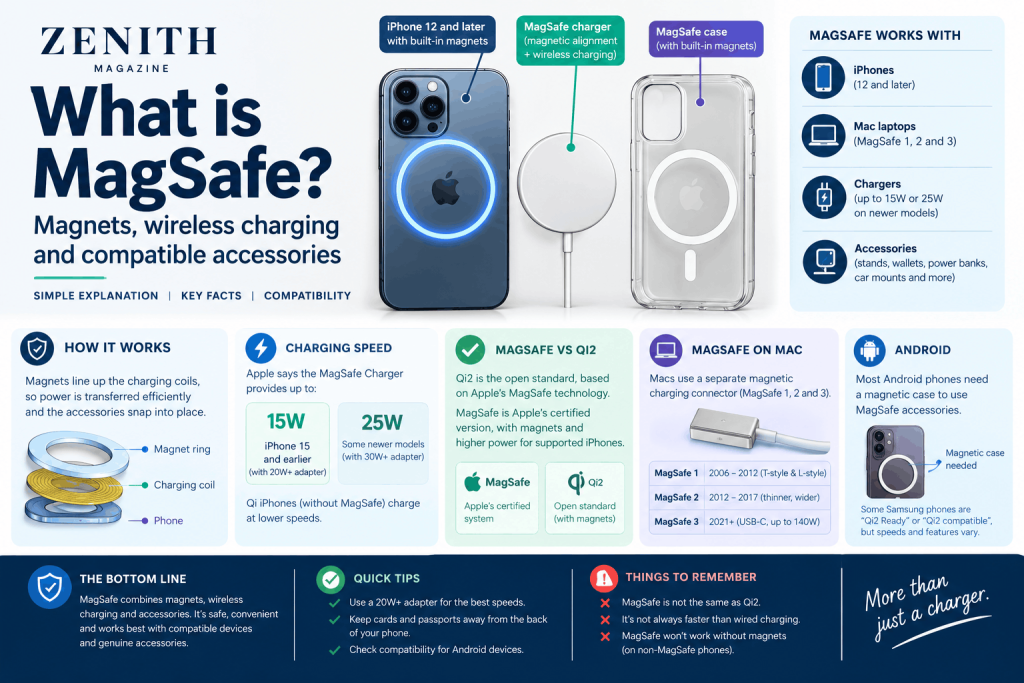
MagSafe is Apple’s magnetic system. On iPhone 12 and later it snaps chargers and accessories to the back of the phone and charges it wirelessly, at up to 15W on iPhone 15 and earlier and up to 25W on some newer models, according to Apple. On Mac laptops, MagSafe is a separate magnetic charging cable. Android phones generally need a magnetic case to join in.
Key Takeaways
- MagSafe means two different things. On an iPhone it is wireless charging plus magnetic accessories, and on a Mac it is a magnetic charging connector, so “MagSafe 1 and 2” belong to Macs, not phones.
- Magnets are the point. They keep the charging coils lined up, which is why MagSafe and Qi2 chargers are described as more reliable than flat Qi pads.
- Android is murkier. Samsung’s recent phones are described as Qi2 Ready or Qi2 compatible but, according to the sources we read, lack built-in magnets, and sources disagree on speeds.
What is MagSafe?
What is MagSafe? It is the name Apple uses for magnetic charging and attachment on two product lines. The first MagSafe was a Mac laptop charging connector, introduced on 10 January 2006 with the MacBook Pro (Wikipedia). The iPhone version arrived with the iPhone 12 and is based on the Qi wireless charging standard.
What does MagSafe mean?
What does MagSafe mean? None of the sources we read explains the name. Our reading is that it describes Apple’s original design: Wikipedia describes the connector as held in place magnetically so that, if tugged, it comes away. We have not found an Apple statement on the origin of the name.
What is MagSafe charging?
What is MagSafe charging in practice? You place a MagSafe Charger on the back of a compatible iPhone, and magnets line it up. Apple says to plug the charger into power before placing the iPhone on it. If you did it the other way round, remove the phone, wait three seconds and set it down again.
What is MagSafe case compatibility?
A MagSafe case is a phone case with a ring of magnets built in, so the phone still snaps onto magnetic chargers and accessories through the case. This is our description based on how retailers and guides use the term. Apple’s iPhone charging page says to remove credit cards, security badges, passports and key fobs from cases before charging, because magnets can damage magnetic strips or RFID chips.
How it charges
How does MagSafe work?
How does MagSafe work? A wireless charger passes power to the phone through coils, the same basic approach as Qi. Magnets hold the coils in alignment, and Faceofit says this reduces energy lost as heat. The iPhone limits charging to 7.5W unless it detects official MagSafe hardware, according to the same source.
Apple’s figures for its own MagSafe Charger:
- Up to 15W: iPhone 15 and earlier, with a 20W or greater USB-C adapter. iPhone 12 mini and 13 mini can reach 12W.
- Up to 25W: some newer models, with a 30W or greater adapter rated 15V/2.0A or higher. Apple’s page says the power delivered varies by iPhone model.
- Other Qi iPhones: phones without MagSafe, such as the iPhone 8, X, XR and 11, can charge on it, with different power levels and charge times.
Apple also says that if the phone is connected to power through its port as well, it charges through that port. Software may limit charging above 80 per cent if the battery gets too warm.
Is MagSafe faster than Lightning?
Is MagSafe faster than Lightning? Apple’s fast-charge page suggests wired charging is generally quicker on the models it lists. For example, it says the iPhone 17e and iPhone Air reach up to 50 per cent in around 30 minutes wired with a 20W adapter, and that the newest Pro models reach 50 per cent in around 15 minutes wired but around 30 minutes with MagSafe. The page does not give Lightning-specific times for older phones, so we cannot compare MagSafe with Lightning directly. Check Apple’s page for your model.
MagSafe vs Qi wireless charging
MagSafe vs Qi wireless charging is mostly about alignment and speed. Qi is the open wireless charging standard, and any Qi phone can charge on a flat Qi pad. MagSafe adds magnets and Apple’s higher power for supported iPhones. Faceofit says non-magnetic Qi phones will not attach to MagSafe or Qi2 pads and should be tested on a flat Qi pad.
MagSafe on Mac: the difference between MagSafe 1 and MagSafe 2
The difference between MagSafe 1 and MagSafe 2 concerns Mac laptop chargers, not phones.
| Generation | What it is | Notes |
| MagSafe (1) | Original T-style and L-style connectors, 2006 onwards | Used on MacBooks to mid-2012 (Wikipedia) |
| MagSafe 2 | Thinner, wider connector, introduced 11 June 2012 | Used on Retina MacBook Pros and MacBook Airs to 2017 (Wikipedia) |
| MagSafe 3 | Magnetic connector with a USB-C cable, returned in 2021 | Up to 140W on the 16-inch MacBook Pro (Wikipedia) |
Apple’s identification page says MagSafe 2 and original MagSafe adapters are not compatible with MagSafe 3. A MagSafe to MagSafe 2 converter is the one bridge Apple lists. Apple phased out the original MagSafe and MagSafe 2 with the 2016 MacBook Pro and 12-inch MacBook (Wikipedia). MagSafe 3 is on MacBook Pro models from 2021 onwards (excluding the 2022 13-inch) and MacBook Air from 2022 (Apple).
Accessories
MagSafe accessories attach to the same magnetic ring: chargers, power banks, wallets, stands and car mounts. Keep cards away from the back of the phone and the charger, as Apple warns.
Anker MagGo vs Apple MagSafe
Anker MagGo vs Apple MagSafe is a comparison between a third-party Qi2 range and Apple’s own. Anker’s page describes its MagGo charger as 15W Qi2, and the sources we read say MagSafe is certified through Apple’s Made for iPhone (MFi) programme while Qi2 is certified by the Wireless Power Consortium (Belkin). Belkin says Qi2 chargers work with MagSafe iPhones, at up to 15W, or 25W with a Qi2.2-certified charger. We found no independent test or UK pricing, and Anker is a seller, so we cannot name a winner.
Compatibility
Qi2 charging vs MagSafe compatibility
Qi2 charging vs MagSafe compatibility is good news for iPhone owners. The Wireless Power Consortium’s Qi2 standard is based on Apple’s MagSafe technology (Belkin). Android Central reports that Apple gave MagSafe to the consortium for inclusion in Qi2, and that the consortium says every device branded Qi2 must include magnets. MagSafe iPhones therefore charge on Qi2 chargers, and Qi2-certified accessories work with them.
Can you use a MagSafe charger on a Samsung S26?
Can you use MagSafe charger on Samsung S26 devices? Sources point to a qualified yes. Anker describes the S26 series as “Qi2 Ready” without the built-in magnets needed for native magnetic charging, so it needs a magnetic case to snap on. Belkin says the S25 and S26 support Qi2 and need a Qi2-certified magnetic case for proper alignment, but can still charge wirelessly without one. Faceofit says phones without magnets fall back to standard Qi speeds. The sources disagree on speeds: Anker says the S26 Ultra can reach up to 25W with correct placement. We could not open a Samsung page, so check Samsung’s specifications.
Converting a non-MagSafe case to MagSafe, and MagSafe ring adapters for Android
Converting non magsafe case to MagSafe usually means adding a magnetic adapter ring. A ring is a sticker that goes on the back of the phone or case so that MagSafe accessories can attach. PopSockets describes its adapter ring as sticking to the back of a device and allowing you to snap on MagSafe accessories. For a MagSafe ring adapter for Android phones, the same idea applies. The listing does not mention wireless charging, and Faceofit recommends cases under 3mm with no metal parts near the coil, so our reading is that a ring placed over the coil could interfere with charging. That is untested here. Test before relying on it.
Common mix-ups
- MagSafe is not one thing. The iPhone feature and the Mac cable share a name and a magnet, nothing else.
- Magnets alone do not mean fast charging. Speed depends on the phone, the charger and the power adapter.
- Qi2 and MagSafe are related, not identical. Qi2 is the open standard, and MagSafe is Apple’s certified version.
Frequently Asked Questions
What does MagSafe do?
On an iPhone, MagSafe lines up a wireless charger with the phone’s coils and lets you snap on magnetic accessories. Apple says its MagSafe Charger reaches up to 15W on iPhone 15 and earlier, and more on some newer models.
Is MagSafe the same as Qi2?
Not exactly. Qi2 is the Wireless Power Consortium’s standard, based on Apple’s MagSafe technology, and requires magnets. MagSafe iPhones charge on Qi2 chargers, and MagSafe is Apple’s own certified version.
Do I need a MagSafe case?
For iPhone wireless charging, no. Belkin says iPhones do not need a MagSafe case for Qi2 charging, though a case with magnets keeps the phone attached. Android phones without built-in magnets need a magnetic case to snap on.
Can I use MagSafe on a non-MagSafe phone?
A Qi phone can charge wirelessly on a flat Qi pad, but without magnets it will not snap onto MagSafe or Qi2 pads. A magnetic ring adapter may attach accessories, but its effect on charging is untested here.
What is the difference between MagSafe 1 and MagSafe 2?
Both are Mac laptop charging connectors. MagSafe 2 is a thinner, wider connector from 2012, and Apple says MagSafe 2 and original MagSafe adapters are not compatible with MagSafe 3.
Is MagSafe faster than wired charging?
Apple’s fast-charge page lists wired charging as quicker for the models it covers. For one new Pro model it says around 15 minutes to 50 per cent wired against around 30 minutes with MagSafe.