Quick Answer
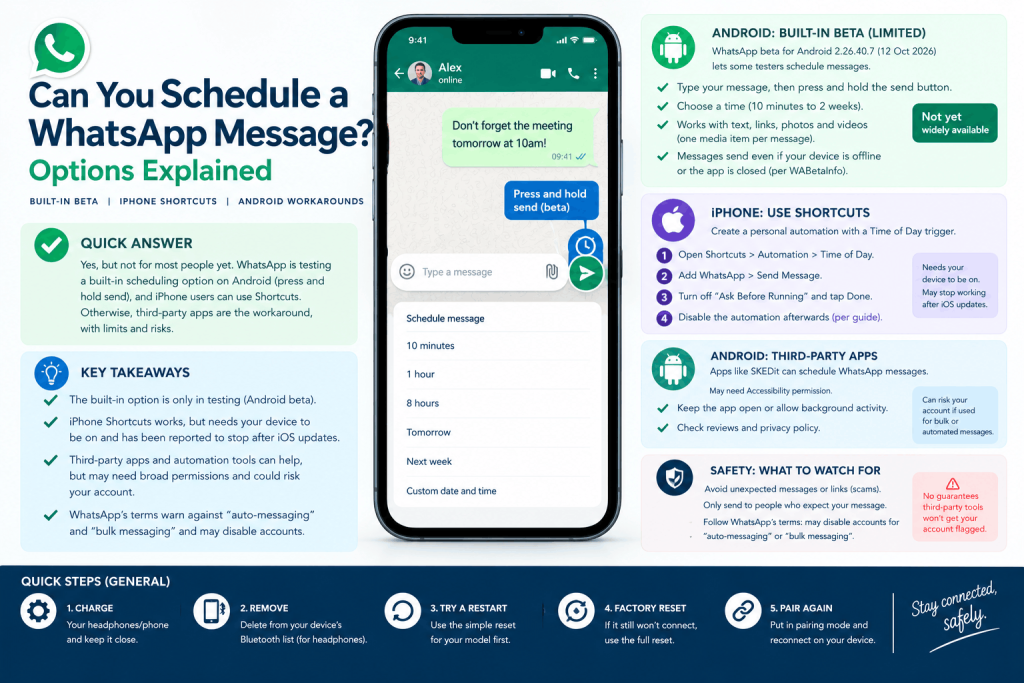
Can you schedule a message on WhatsApp? Not for most people yet. According to WABetaInfo, WhatsApp began testing a built-in option on 12 October 2026: type a message, then press and hold send. It is limited to some Android beta testers, and WhatsApp has made no announcement. Until it reaches you, iPhone Shortcuts or third-party apps are the workarounds, and they carry limits and account risks.
Key Takeaways
- The built-in option exists only in testing. Reports say it lets you schedule from 10 minutes to two weeks ahead, but access is limited to some Android beta testers and WhatsApp has said nothing officially.
- iPhone’s Shortcuts app is the one workaround that needs no extra app, but our source for the steps dates from 2022, with one reader reporting it stopped working on an iOS update.
- Automating WhatsApp can break its rules. WhatsApp’s terms give “bulk messaging, auto-messaging, auto-dialing” as examples of impermissible communications, and say it may disable accounts that break them.
Does WhatsApp have a schedule message option?
Can you schedule a WhatsApp message with the app alone? Only if you are one of a small group of testers. WABetaInfo (12 October 2026) reports that WhatsApp beta for Android 2.26.40.7, available through the Google Play Store, is rolling out scheduling to some beta testers, with wider access expected over the coming weeks. The Star (15 October 2026) says WhatsApp “has not made any official announcement”, and that its information comes from WABetaInfo and its own testing.
Until then, the answer in a 22 August 2026 article by Blueticks, a company that sells a scheduling tool, was that neither the personal app nor WhatsApp Business had a send later feature. Treat the beta as a test that may change before it reaches everyone.
WhatsApp schedule message long press send button: how the beta works
WhatsApp schedule message long press send button is how WABetaInfo says the test works. Type your message, then tap and hold the send button, and a bottom sheet lets you pick the delivery time. The reported details:
- Timing: at least 10 minutes ahead and up to two weeks.
- Content: text, links, photos and videos, one media item per scheduled message. WABetaInfo says it works with end-to-end encryption.
- Delivery: WABetaInfo says the message sends at the chosen time even if your device is offline or the app is closed. WhatsApp has not explained how.
- Managing: scheduled messages appear in a section of the chat info screen, where you can view, edit or delete them. The recipient is not told it was scheduled.
- Groups: supported, but only members in the group when you schedule it receive the message.
- Desktop: The Star says desktop shows a clock icon beside send, after you type a message.
The Star adds that WABetaInfo spotted an iPhone version in TestFlight in February. We found no sign it has reached normal iPhone users.
iPhone: schedule WhatsApp messages with Shortcuts
How to schedule WhatsApp message on iPhone Shortcuts
How to schedule WhatsApp message on iPhone Shortcuts, according to Guiding Tech (published 31 March 2022, updated 19 July 2024):
- Open Shortcuts, tap Automation and create a personal automation with a Time of Day trigger. Set the date and time.
- Add an action, choose WhatsApp, then Send Message. Enter the message and pick the recipient.
- Turn off “Ask Before Running” and tap Done.
- Afterwards, disable the automation, because the article says to avoid it repeating (it chose Monthly under Repeat).
Apple’s own Shortcuts page says Time of Day is among the automations that can run automatically, and that you turn off Ask Before Running and tap Don’t Ask to confirm. It adds that you may need to set individual actions to run automatically as well.
The limits are real. Blueticks says Shortcuts time-of-day automations need the iPhone to be on and available at the scheduled time. A commenter on the Guiding Tech article reported that scheduled messages stopped sending after the iOS 17.5.1 update in June 2024. That is one reader’s report, and we have not tested it.
Automatically send WhatsApp message at specific time iPhone
To automatically send a WhatsApp message at a specific time on an iPhone, the Shortcuts route above is the only built-in method we found. Check it on your own phone with a message to yourself before relying on it for something important.
Siri Shortcuts WhatsApp automation script
Siri Shortcuts WhatsApp automation script is a looser term than it sounds. We found no Apple page that describes a Siri-triggered way to schedule WhatsApp. The Shortcuts automation above is the closest thing, and it runs from a time trigger rather than a voice command.
Android: options with and without an app
How to schedule WhatsApp messages on Android without app
How to schedule WhatsApp messages on Android without app: the beta feature above is the only no-extra-app route we found, and it is limited to some testers. Engati, a vendor, says WhatsApp has no built-in scheduling feature. Without the beta, you need a third-party app, which is our reading rather than a tested result.
Tasker profile for scheduling WhatsApp messages
A Tasker profile for scheduling WhatsApp messages is a do-it-yourself route, and none of the pages we read gives steps for it. Blueticks says Android assistants and automation tools are third-party, need the phone to be awake, and can be deferred by Android’s Doze power-saving mode.
Scheduling WhatsApp messages via Macro Droid
Scheduling WhatsApp messages via Macro Droid (the Android automation app is usually written MacroDroid) falls under the same limits as Tasker. We did not find a source that explains how to set it up, and we have not tested it.
Scheduler apps and the accessibility permission
Engati describes one scheduler, SKEDit, that sends WhatsApp messages automatically. It needs the Accessibility permission, and Engati warns that using schedulers to spam may get your account banned and advises checking reviews and avoiding apps that request unnecessary permissions. Accessibility access is broad, so read what an app asks for before granting it.
Can you schedule a message on Samsung WhatsApp?
Can you schedule a message on Samsung WhatsApp? WhatsApp is the same app on a Samsung Galaxy as on other Android phones, so the beta and the third-party routes above apply. We found no Samsung setting that schedules WhatsApp messages. Search results suggest Samsung’s own scheduling is for text messages (SMS), but we did not open those pages, so check your phone’s Messages app.
Business option: WhatsApp Business app and Business Platform
The WhatsApp Business app has greeting and away messages, but Blueticks says these are auto-replies triggered by incoming messages. You cannot pick a recipient or a time. They are not scheduling.
Larger businesses use the WhatsApp Business Platform. Meta’s documentation says that outside an open customer service window, template messages are the only message type you can send, and that templates must be approved first (review can take up to 24 hours). The page does not describe scheduled sending, and providers such as ChatMaxima say they offer scheduling on top of it. That is a vendor claim. We found no UK pricing.
Safety: what can go wrong
WhatsApp’s Terms of Service (version effective 4 January 2021) list “bulk messaging, auto-messaging, auto-dialing” as examples of impermissible communications. They bar attempting unauthorised access “directly or through automated means”, and say WhatsApp may disable or suspend accounts that break its terms. The terms do not set thresholds for what triggers action.
Blueticks says no tool can guarantee a message will not lead to a ban. That is the author’s view, from a company that sells such a tool. Consent matters too: send scheduled messages only to people who expect them.
How to automate WhatsApp messages using Python
How to automate WhatsApp messages using Python usually means the pywhatkit library. A Towards Data Science tutorial (27 October 2022) says it works through WhatsApp Web, opens a browser tab with the message typed in, and, at the time, did not send it automatically. The author used pyautogui to press Enter after a fixed wait and called that approach fragile. The tutorial does not discuss WhatsApp’s terms. Because the terms cover “auto-messaging”, we would not recommend this for anything beyond a personal test.
How to schedule a message on WhatsApp Web Chrome extension
How to schedule a message on WhatsApp Web Chrome extension: Blueticks says browser-based schedulers on WhatsApp Web need the browser tab to stay open. We did not test any extension, so we do not name one. Check the permissions it asks for, its reviews and its privacy policy first.
Frequently Asked Questions
How do you send a WhatsApp message later?
Right now, the built-in route is the beta: type a message, then press and hold send. It is limited to some Android beta testers. Otherwise, use iPhone Shortcuts or a third-party scheduler, and weigh the limits and risks above.
Can you schedule a WhatsApp message on iPhone?
Yes, with a workaround. A Shortcuts personal automation with a Time of Day trigger and the WhatsApp Send Message action, with Ask Before Running turned off. A 2022 guide describes it, and one reader reported it broke on iOS 17.5.1.
Can you schedule a message on Samsung WhatsApp?
We found no Samsung setting for it. WhatsApp is the same app on Samsung phones, so the beta feature or a third-party scheduler is the route. Samsung’s own scheduling appears to cover SMS only, which we have not confirmed.
Can I schedule WhatsApp messages on Android without an app?
Only through the beta test, if you have access. Otherwise, Engati says WhatsApp has no built-in scheduling, so you need a third-party app, which usually asks for broad permissions such as Accessibility.
Will scheduling a WhatsApp message get my account banned?
WhatsApp’s terms give “auto-messaging” and bulk messaging as examples of impermissible use and allow it to disable accounts. The built-in beta is WhatsApp’s own feature. Third-party tools and scripts are where the risk lies.
Does the WhatsApp Business app let you schedule messages?
Blueticks says it does not. It has greeting and away messages, which are auto-replies. Larger businesses can use the WhatsApp Business Platform with approved templates, and providers offer scheduling on top of it.