Quick Answer
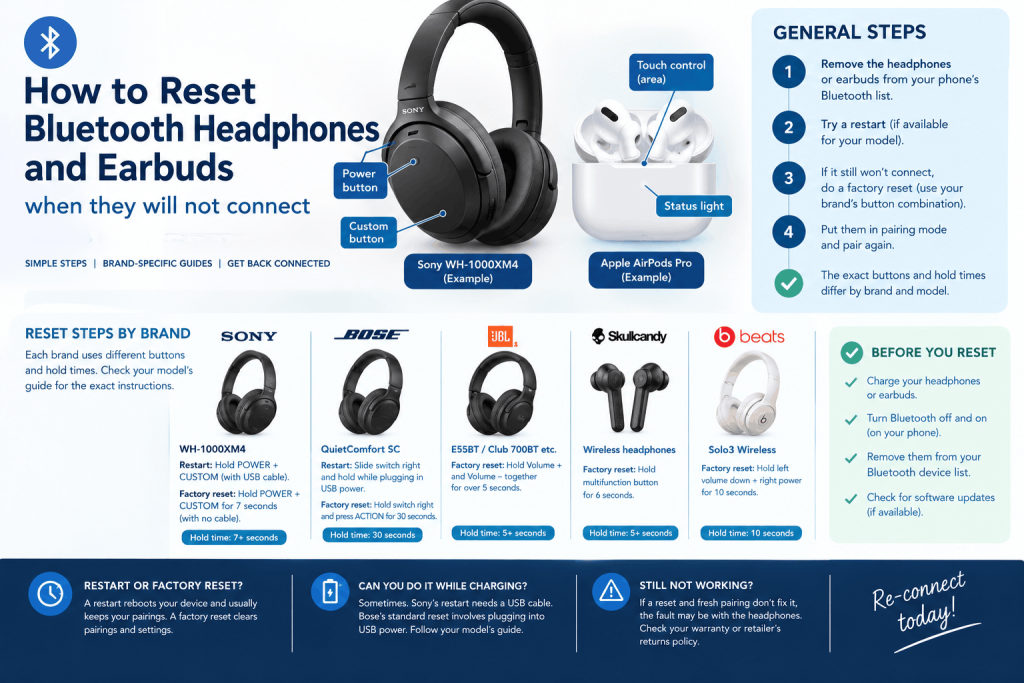
How to reset Bluetooth headphones: first remove them from your phone’s Bluetooth list, then use your manufacturer’s button combination. Most involve holding two buttons for roughly 5 to 30 seconds, depending on the brand. A restart keeps your pairings, while a factory reset clears them, so you will need to pair again. The combination differs by model, so check yours.
Key Takeaways
- There is no single master combination. The brands we checked use different buttons and hold times, from about 5 seconds to 30 seconds.
- Brands separate a restart from a factory reset, and only the factory reset clears pairing. Try the gentler one first.
- Being plugged into a charger helps with some restarts and rules out others. Sony’s restart needs a USB cable, while its factory reset needs the cable removed.
Before you reset: try the simple fixes first
A reset is a last step, not a first one. Charge the headphones, switch Bluetooth off and on again on your phone, and remove (“forget”) the headphones from the phone’s Bluetooth list. The brand pages we read tell you to remove the headphones from your device list around a factory reset, so it is worth doing early.
If your headphones connect to several devices, clearing the list can also fix them. Bose describes two ways to do this on its QuietComfort Ultra Headphones (2nd Gen): hold the Bluetooth/Power and Multi-function buttons together until the headphones announce that the device list is cleared, or open the Bose app, tap Source, then Edit, and remove each device.
How to clear paired devices list from wireless headphones
How to clear paired devices list from wireless headphones depends on the brand, and on whether you want the full factory reset. Sony, Skullcandy and Bose all say a factory reset clears pairing. Bose’s QuietComfort Ultra method above clears only the list. Afterwards, delete the headphones from your phone’s Bluetooth list as well, or the phone may try to reconnect to a pairing the headphones no longer have.
General steps: how to reset Bluetooth headphones
These steps are our summary of the brand guidance below. They are not a single manufacturer’s instructions.
- Charge the headphones for a while, and keep them close to the phone.
- Remove them from the Bluetooth list on every phone, tablet or laptop they were paired with.
- If they are frozen or unresponsive, try the restart for your model first.
- If they still will not connect, do the factory reset for your model.
- Put the headphones in pairing mode and pair them again.
Force restart vs factory reset Bluetooth earbuds
Force restart vs factory reset Bluetooth earbuds is a distinction the manufacturers make in their own words. Sony calls them “reset” and “initialise”. Bose calls them standard reset and factory reset. Skullcandy calls them hardware (HW) reset and factory default. In each case the quick restart is for unresponsive headphones, and the factory reset is for stubborn problems.
| What it does | Restart or hardware reset | Factory reset |
| Clears pairing | No, according to Bose | Yes (Sony, Bose, Skullcandy) |
| Clears settings | No, according to Bose | Yes |
| When to use | Frozen or unresponsive | Persistent problems, or when the maker advises |
Beats uses a similar split on the Pill speaker: Apple says holding the centre button for at least 10 seconds keeps paired devices and the custom name, while holding the centre and volume down buttons for at least 15 seconds resets everything. Apple’s page for earbuds says to hold the case’s system button for 15 seconds with both earbuds in the open case (Beats Fit Pro, Powerbeats Fit, Studio Buds +, Powerbeats Pro 2), or hold each Solo Buds earbud’s button for at least 10 seconds.
Is there a headphone master reset button combination?
There is no headphone master reset button combination that works across brands. The brands we checked use volume buttons, power and custom buttons, a power switch plus an action button, or a single multifunction button, with hold times from about 5 to 30 seconds. Holding the wrong buttons can switch the headphones off, change the volume or activate a voice assistant, so use your model’s guide.
Reset Bluetooth headphones while plugged into charger: when it works
Sometimes the cable is part of the method:
- Sony WH-1000XM4: the restart is done with the USB cable connected. The factory reset needs the cable removed.
- Bose QuietComfort SC and QuietComfort Headphones: the standard reset means holding the Power/Bluetooth switch to the right while plugging into a USB-A power source.
- JBL and Skullcandy (pages we read): the reset is done with the headphones switched on, with no mention of a cable.
So you can reset Bluetooth headphones while plugged into charger for some restarts, but not for every factory reset.
Bluetooth headphones touch controls not responding reset: what the guides say
For Bluetooth headphones touch controls not responding, we found no manufacturer page that deals with touch controls specifically. What the pages do say is that restarts are meant for unresponsive or frozen headphones (Bose and Skullcandy). So a restart is a reasonable first try, but we cannot promise it fixes a touch fault, and a factory reset would also wipe your custom settings.
Common brands: reset steps and hold times
Each row is from the maker’s own support page unless stated. Models differ, so confirm yours.
| Brand and model | Restart | Factory reset |
| Sony WH-1000XM4 | Connect USB cable, press POWER and CUSTOM together | Power off, remove cable, hold POWER and CUSTOM for 7 seconds or more; blue light flashes four times |
| Bose QuietComfort SC | Slide Power/Bluetooth switch right and hold while plugging into USB-A power | Remove from phone and Bose app, hold switch right, then hold Action for 30 seconds |
| JBL (E55BT, Club 700BT and other listed models) | Not given on the page | Switch on, hold Volume + and Volume – together for over 5 seconds |
| Skullcandy (over-ear) | Hold multifunction button 10 to 15 seconds (hardware reset) | Not connected, hold multifunction button 6 seconds |
| Beats Solo3 Wireless | Not given | Hold volume down (left) and power (right) for 10 seconds (secondary source) |
How to reset Sony Bluetooth headphones WH-1000XM4
Sony’s page for the WH-1000XM4 (last modified 25 October 2022) gives both. To restart, connect the USB cable and press POWER and CUSTOM together. To initialise (factory reset), turn the headset off with no cable connected, then hold POWER and CUSTOM for 7 seconds or more until a blue indicator flashes four times. Sony says this resets settings and pairing information, so remove the headset from your device list and pair again.
How to reset Bose QuietComfort headphones
How to reset Bose QuietComfort headphones depends on the model. For the QuietComfort SC, plug a USB cable into the left earcup, slide the Power/Bluetooth switch right and hold it while connecting the other end to a USB-A power source. This reboots them without clearing settings. For the factory reset, Bose says to remove the headphones from your phone and Bose app first, then hold the switch right and press and hold Action for 30 seconds. The light blinks white, then amber, then slowly blue. Bose recommends this only for ongoing problems or when its customer service tells you to. We read the SC page, not every QuietComfort model’s.
How to factory reset JBL Bluetooth headphones
How to factory reset JBL Bluetooth headphones is simplest on the models JBL’s UK page lists, including the E55BT, Reflect Mini 2, Club 700BT, E45BT, E500BT, T450BT, Club One and Club 950NC. Switch them on, hold Volume + and Volume – together for over 5 seconds, and watch for the light to blink two colours. JBL’s other pages for different ranges (such as Live and Everest) exist, but we did not read them.
How to reset Skullcandy wireless earbuds
Skullcandy’s official guide (1 April 2026) covers wireless headphones and does not address earbuds directly, so how to reset Skullcandy wireless earbuds is not confirmed here. For headphones, it gives two options. Factory default: power on, make sure they are not connected, hold the multifunction button for 6 seconds, wait for a tone or light, then pair again. Hardware reset: hold the button for 10 to 15 seconds, and the headphones power off abruptly. Skullcandy recommends checking your model’s product guide.
Resetting Beats Solo 3 Bluetooth wireless headphones
Apple’s “Reset Beats” page does not cover the Solo3 Wireless, so resetting Beats Solo 3 Bluetooth wireless headphones relies on a secondary source. SlashGear (5 September 2025, linking to Apple) says to hold the volume down button on the left earcup and the power button on the right earcup for 10 seconds until the lights flash white. Apple’s own page gives the same pair of buttons and 10 seconds for the newer Solo 4. Confirm on Apple’s support site before publishing.
Pairing again after a reset
Once the reset is done, the headphones start as new. Put them in pairing mode (the manual or app tells you how), then choose them from your phone’s Bluetooth list. Sony and Bose both say to remove the old entry first. If the phone lists the headphones twice, delete both and start again.
Bose adds that the app method for clearing devices does not require removing the headphones from your phone’s list, but the button method does.
When to replace them
If a factory reset and a fresh pairing on a second device both fail, the fault is probably in the headphones rather than your phone. That is our reading, not a manufacturer statement. Check the warranty or the retailer’s returns policy before buying again. GOV.UK sends people to Citizens Advice for faulty goods rights in England and Wales, and we could not open the specific guidance, so check the time limits there. Bose also says to contact customer service if a factory reset does not solve the problem.
Frequently Asked Questions
How do you factory reset Bluetooth headphones?
Remove them from your phone’s Bluetooth list, then use your model’s factory reset. Examples: Sony WH-1000XM4, hold POWER and CUSTOM for 7 seconds or more; JBL listed models, hold Volume + and Volume – for over 5 seconds. Afterwards, pair again.
What is the difference between a restart and a factory reset?
A restart reboots frozen headphones. Bose says its standard reset keeps device settings, so pairing stays. A factory reset restores original settings and clears pairing, so you must reconnect each device. Use it only after a restart fails.
Do I need to remove the headphones from my phone after a reset?
Yes, in the cases we read. Sony says to remove the headset from the Bluetooth list and pair again after initialising, and Bose says to remove it before a factory reset. Otherwise the phone may try to reconnect to a pairing that no longer exists.
Can I reset headphones while they are charging?
It depends. Sony’s restart requires the USB cable to be connected, but its factory reset requires it removed. Bose’s standard reset involves plugging into USB power while holding the switch. Follow your model’s guide.
How do I reset Beats Solo3 wireless headphones?
One secondary source, SlashGear, says to hold the left volume down button and right power button together for 10 seconds until the lights flash white, then pair again. Apple’s Reset Beats page does not list the Solo3, so confirm on Apple’s site.
Will a reset fix touch controls that do not respond?
It might, but no manufacturer page we read promises it. The pages describe restarts for frozen or unresponsive headphones. Try a restart first, because a factory reset wipes your settings as well.