Quick Answer
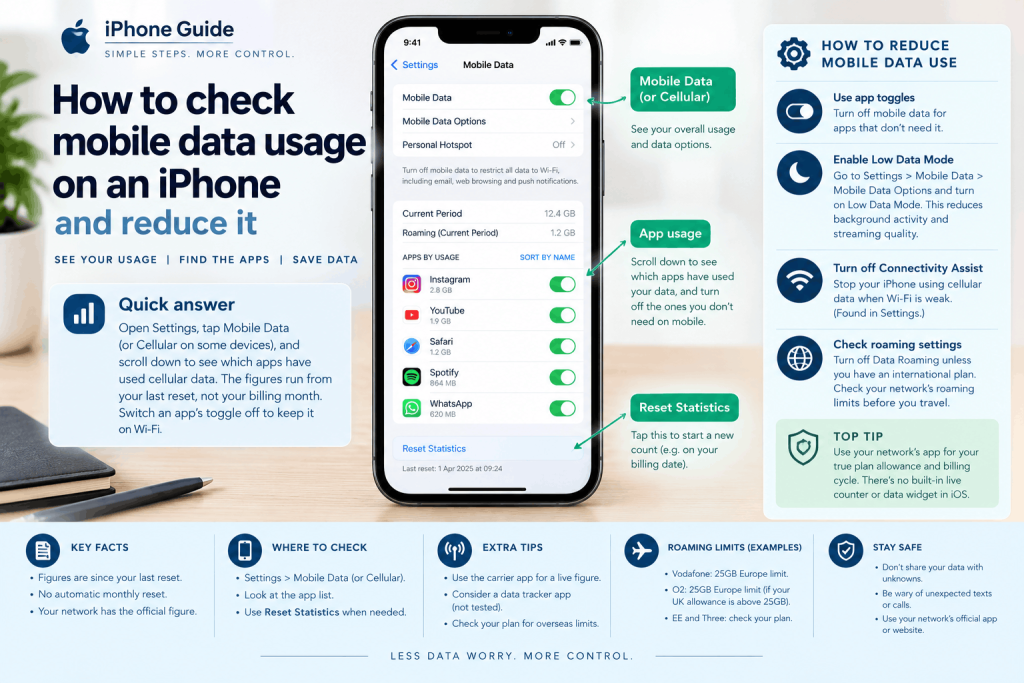
How to check for data usage on iPhone: open Settings, then Mobile Data (called Cellular on some devices). Scroll down to see which apps have used cellular data. The figures run from your last reset, not necessarily your billing month, and Apple says your network provider has the most accurate current-period figure. Switch an app’s toggle off to keep it on Wi-Fi.
Key Takeaways
- The Settings figure is a running total since you last tapped Reset Statistics. Apple’s page does not say it restarts by itself, so a monthly reset on your billing date is the simple fix.
- We found no Apple page describing a live data counter or a built-in data widget. For your plan allowance, the network’s own app is the route we would try first, which is our reading rather than a tested result.
- Abroad is where bills go wrong. Vodafone and O2 both describe a 25GB monthly Europe limit, and Ofcom says providers must publish roaming charges.
Settings: how to check data usage on iPhone
The built-in answer sits in Settings, and it needs no app. The steps follow Apple’s support page on cellular data.
How to check data usage on iPhone in Settings
- Open Settings.
- Tap Mobile Data (on some devices and in some regions it is called Cellular).
- Look at the usage figures near the top, then scroll down for the list of apps.
If you have two SIMs, tap the line you want to look at first. Apple’s page says you can see statistics for a current period, and for apps that used data while roaming.
How to view cellular data usage this month iPhone: the reset catch
Here is the catch. Apple’s page does not say that the “current period” matches your billing month, and does not say the statistics restart by themselves. A 2018 Gadget Hacks guide (written about US networks) says they do not reset automatically and that you need to tap Reset Statistics at the start of each billing cycle.
So to view cellular data usage this month, reset the statistics on the day your billing cycle starts. For a figure against your actual allowance, Apple says to contact your network.
How to reset cellular data statistics on iPhone
- Open Settings and tap Mobile Data (or Cellular).
- Scroll to the bottom and tap Reset Statistics.
This clears the totals for every app. It does not change your plan, and the Czech site Let’s Talk Apple reports that it also clears the hotspot usage data described below.
Per-app use: where is your data going?
Tracking mobile data by app on iOS
The same screen is the tool for tracking mobile data by app on iOS. Apps are listed in the Mobile Data screen, and Apple says the toggle next to each one controls whether it may use cellular data. Turn it off and, in Apple’s words, that app uses “only Wi-Fi for data.”
A practical habit is to look at the list after your first week of a billing cycle. Anything near the top that you did not expect, such as a video or cloud storage app, is the first one to restrict.
Monitoring hotspot data usage by connected device iPhone: the newer option
Per-device hotspot figures are a newer feature, and our source is a single news article rather than Apple. Let’s Talk Apple (27 September 2026) reports that Personal Hotspot now shows how much each connected device has used, plus a total.
- Where: Settings, then Personal Hotspot, then Data usage.
- Which software: the article says iOS 26.4 or later, but its screenshots are labelled iOS 27, so the version is unconfirmed.
- Limits: devices on iOS or macOS 26.4 or later appear by name. Android, Windows and older systems may be grouped as “Other devices”. The Data usage option appears only if you have used the hotspot recently.
Check this on your own phone before relying on it. We have not seen Apple’s own page for it.
Network apps: trackers, widgets and live monitors
Best data tracker app for iPhone
We cannot name a best data tracker app for iPhone. We did not test any, and we found no independent comparison. What we can say is why a network’s own app is a sensible first try: it can see your actual plan and billing cycle, which the Settings screen cannot. Vodafone’s roaming page, for example, points customers to My Vodafone or the Vodafone app to set spend limits. Gadget Hacks (2018) also describes carrier apps showing data used and time left. We have not opened the EE, O2 or Three pages, so check what yours offers.
Third-party tracker apps also exist in the App Store. Look at what permissions they ask for, and treat their numbers as estimates unless they match your network’s.
Real-time data usage monitor for iPhone screen
For a real-time data usage monitor on the iPhone screen, we found no feature in Apple’s support pages. The Settings figures are totals, not a live counter. If you need to watch usage as it happens, you are relying on a network or third-party app, which we have not tested.
How to track daily data usage on iOS widget
A widget for daily figures has no Apple answer that we could find. Gadget Hacks (2018) says some carriers offer widgets, but not all, so look in your network’s app or the widget gallery. A workaround of our own, untested: tap Reset Statistics each morning and read the total that evening. It also wipes the hotspot figures, so skip it if you need those.
Saving data: what to turn off
- Per-app toggles: switch off the apps that do not need mobile data, as above.
- Low Data Mode: go to Settings, then Mobile Data, then Mobile Data Options and turn on Low Data Mode. On 5G, Apple says to select Data Mode first. Apple says it also turns off Background App Refresh, lowers streaming quality, and pauses automatic downloads, backups and iCloud Photos updates. Apple notes that the settings may vary by network provider.
- Connectivity Assist: Apple’s page says this lets the phone use cellular data alongside Wi-Fi when Wi-Fi is weak, and can be turned off in Settings. Older guides call it Wi-Fi Assist. We did not open Apple’s separate article, so check the exact switch location on your phone.
Low Data Mode can also be set separately for a Wi-Fi network (Settings, then Wi-Fi, then the info button beside the network).
Roaming: check before you travel
Apple’s page says Data Roaming is under Mobile Data Options, and warns that if you have an international data plan you may need to leave it on. Turn it off and use Wi-Fi if you do not.
Ofcom’s guidance (last updated 6 July 2026) says providers must publish roaming charges, send an automatic message when you arrive in another country (unless you opt out), and let you set a monthly spend limit that they can only exceed if you agree. It also warns that phones near a border or on a ferry can roam onto a foreign or satellite network by accident.
UK networks also cap data in Europe, and the caps are worth knowing:
| Network | What its page says | Source date |
| Vodafone | Pay monthly plans have a 25GB Europe fair use limit. Extra charges may apply after 62 days of roaming, with a text 14 days before. | Page copyright 2026 |
| O2 | A 25GB Europe limit if your UK allowance is above 25GB. After a warning text, overage is £3.50 per GB. Unfair use means more than 63 days in four months. | Page copyright 2026 |
| EE and Three | Not checked. | Not checked |
Allowances, zones and charges vary by plan, so use your own network’s roaming checker.
Frequently Asked Questions
How do I check data usage on iPhone in Settings?
Open Settings, tap Mobile Data (or Cellular) and read the usage figures. Scroll down to see the apps that used cellular data. The totals run from your last reset, so they may not match your billing month.
Does iPhone data usage reset every month?
Apple’s page does not say it does. It lists Reset Statistics as a manual option, and a 2018 Gadget Hacks guide says the totals do not reset automatically. Reset them on your billing date, or ask your network for the official figure.
How do I see which apps use the most mobile data?
Go to Settings, then Mobile Data, and scroll to the list of apps. Apple says the toggle beside each app controls its use of cellular data. Switch an app off and it uses only Wi-Fi.
Can I see how much data hotspot users have used?
One report, from 27 September 2026, says Settings, then Personal Hotspot, then Data usage shows each connected device. Older or non-Apple devices may appear as “Other devices”. We could not confirm this on an Apple page, so test it on your phone.
Is there a widget that shows daily data usage?
We found nothing from Apple. A 2018 guide says some carriers offer widgets, so look in your network’s app. Third-party apps may also offer one, though we have not tested any and cannot say which is best.
Does Low Data Mode save data?
Apple says it reduces background activity: it turns off Background App Refresh, lowers streaming quality and pauses automatic downloads, backups and iCloud Photos updates. We do not have a figure for how much it saves, as that depends on your habits.